Operational problem
Booking platforms handle appointments and transactions well. That is what they are built for.
They do not manage the operational work that keeps a small service business running day to day: staff accountability, recurring task queues, client follow-up, homecare recommendations, purchase orders, payroll reconciliation, gift card tracking, or content scheduling. That work lived in spreadsheets, separate apps, and the owner's memory.
After 13 years across three platforms — Booker, Square, Boulevard — the pattern was clear: operational data lives inside whoever's platform you are currently paying for, and it leaves with them when you switch. The goal shifted from "use the platform" to "own the data."
What the app does
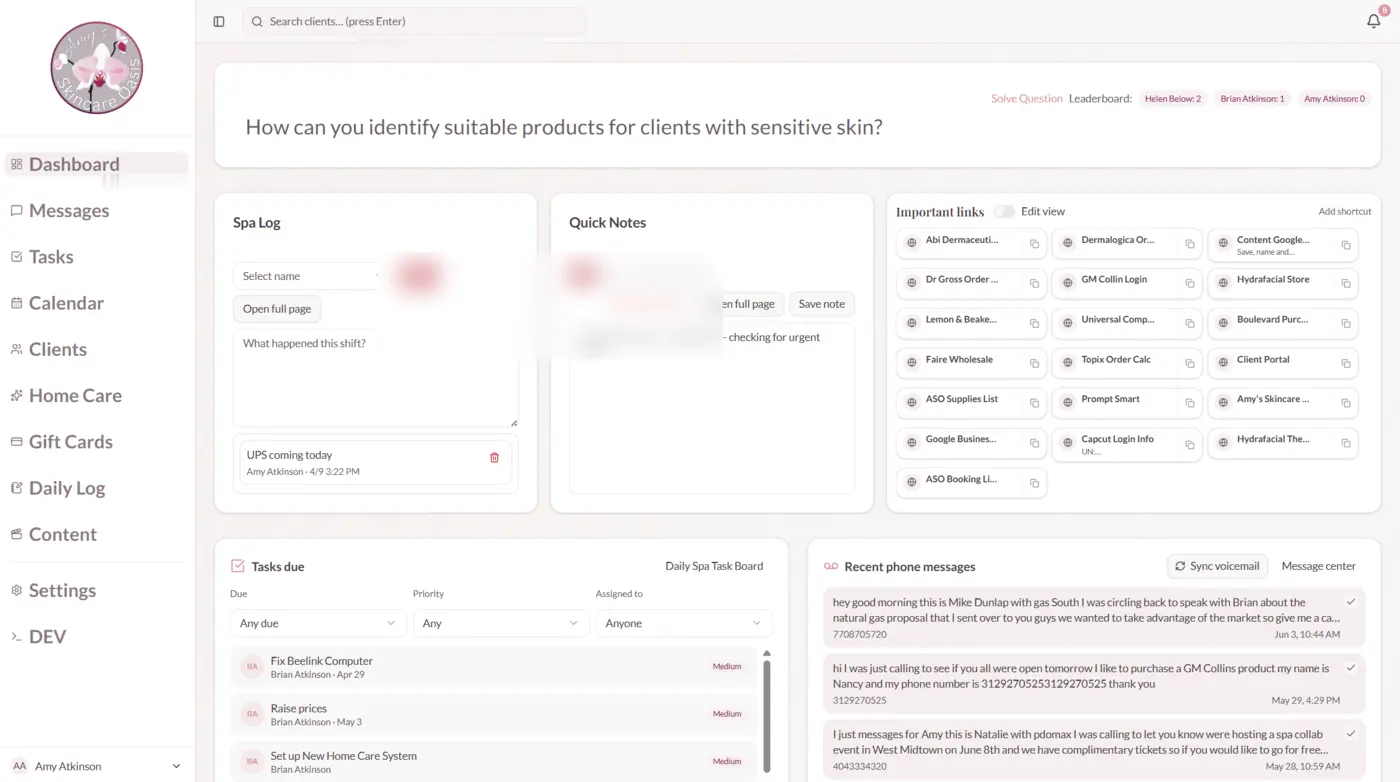
The ASO Work App is an internal operations dashboard built on top of — not instead of — Boulevard. It is the layer between the booking platform and how the spa actually runs day to day. Staff have fewer places to go; the owner has more operational control; and the data belongs to the business, not the vendor.
Daily dashboard and daily log
The staff-facing view on opening the app. A daily log records what happened — transactions, notes, completed tasks. Important links section gives staff click-to-copy booking links for specific services, cutting down on the habit of keeping five browser tabs open for different processes.
Task board
Replaced ClickUp for spa-specific recurring work. States: recurring, needs review, do today, waiting for response, done. Website form fills from potential leads create actionable tasks automatically, so follow-up is an item in the queue, not something that depends on the owner checking email.
Calendar and time-off workflow
Internal time-off requests flow through the app. Future phase: direct integration to programmatically block corresponding time on the Boulevard calendar. Currently the connection between internal request and external calendar block is manual; that loop is on the roadmap to close.
Client CRM
Platform-independent client records: purchase history, visit history, homecare history. Filterable and searchable without exporting from Boulevard. When the spa migrates to the next platform, the data is already in a system the spa controls — the next migration becomes a sync, not a loss.
Homecare routines
Homecare started as a simple form-to-PDF flow built during the Square era. It has since been rebuilt as a retention and replenishment system connected to the client CRM and product catalog.
See Homecare Routine Pipeline → for the full module detail.
Gift card management
Boulevard's gift card system does not provide enough control. Gift cards moved to Shopify as the source of truth. The app tracks the transition period: physical cards activated by staff, e-gift cards generated online, with a log of codes, activation status, and fulfillment method. Shopify is the long-term system; the app manages the transition.
Content library and posting plans
Structured content objects: saved thumbnails, headline copy, body copy. Posting plans assembled from content objects. The goal is not to be the best standalone content tool — it is to keep content visible in the same operational environment staff already use. Future: push posting plans directly into a calendar view.
Payroll
Weekly payroll calculation lives in Settings because it is a scheduled workflow, not a daily task. The engine pulls data from Boulevard, applies the studio's actual pay rules, and produces a reviewable document before any approval.
See Salon Payroll Engine → for the full module detail.
Settings: recurring tasks, contact notifications, daily closeout
Recurring task controls let the owner configure which operational tasks recur and at what frequency. Contact notifications are alert rules per team member. The daily closeout checklist is customizable and staff-facing — sent to whoever is working that day. Staff must open the app and physically check off each item. Not a passive email. Roughly a dozen items covering closing procedures and daily task confirmation.
Communications log and developer tools
Communications history including voicemail ingestion. The spa uses Google Voice as its voicemail line to keep the front desk phone from ringing constantly; ingesting those messages via Gmail API keeps them visible in the operational log without requiring another screen open. This is a supporting detail, not the headline.
Future: full client messaging moves to Klaviyo API, removing the dependency on Boulevard's messaging system entirely. Boulevard messages cannot be automated or accessed externally. The dev area tracks webhook settings and integration logs for troubleshooting.
What changed
| Before | After |
|---|---|
| Staff accountability depended on asking | Daily log and closeout checklist create visible records |
| Task follow-up in ClickUp (generic, not spa-specific) | Task board tuned to spa work, lead follow-up, recurring checks |
| Client data owned by the booking platform | Platform-independent records the spa controls |
| Payroll: 2–3 hours in spreadsheets every Monday | Under 10 minutes with traceable calculation |
| Homecare: verbal instructions or one-off PDF email | Saved, searchable, replenishment-ready client routine links |
| Gift cards: Boulevard-controlled | Shopify as source of truth, app manages transition |
| Content planning: separate app | Content library in the same dashboard |
In progress
- Full Klaviyo-based client messaging (replacing Boulevard's closed system)
- Boulevard calendar blocking from approved time-off requests
- Homecare cart embedding with direct product purchase links
- Replenishment follow-up batches based on routine history
- Shopify as full product catalog source of truth
What this pattern applies to
Any service business on a booking platform that has outgrown what the platform provides beyond appointments. The booking platform stays; the operational layer around it gets built.
Especially relevant for owner-led spas, salons, and med-spas migrating between platforms — or any operator who has watched years of operational data walk out the door when they switched software.
Technical details
Next.js 16 staff dashboard. Supabase backend with 67+ schema migrations representing real operational evolution — not a greenfield design, but a system shaped by how the spa actually runs.
Scheduled imports from Boulevard's API (sales, timeclock, client records, products) via pg_cron. Klaviyo for client-facing delivery (homecare links, appointment follow-up). Shopify for gift card source of truth. Payroll calculation engine and homecare composer detailed in the child case studies below.
The booking platform is the front door. This is the rest of the building.